
Project
LiveFast
Timeline
May - July 2022
My Role
UI Design, Research
Overview
LiveFast is a website that allows users to search for apartments based on their preferences and provides added features to make the apartment hunt more efficient and convenient.

The Problem
College students looking for apartments usually find themselves stressed due to high demand for living spaces in college towns.
Getting To Know The Users
I began the process by conducting user interviews to get a grasp of potential pain points students experience when looking for apartments. The interviews included some demographic questions, followed by questions about their past experiences.
Asking The Right Questions
For the user interviews, I recruited students from my University who currently reside off campus. I tried to keep the questions open ended to best understand their experiences.
Research Questions
-
What do you look for when looking for a place to live?
-
Describe your last apartment hunting experience. How early did you begin your search?
-
What were the main stressors during your search for an apartment?
-
What tools did you use in your search? What did you like or dislike about them?
-
How did you ensure you were getting the best results before finalizing your decision?
Key Insights
I found some common themes among the interviewees' responses. Using an affinity diagram, I drew some insights to better understand their experiences.

-
Users had certain prerequisites in mind before going into the search process.
-
Users wanted a way to organize their search process according to their needs
-
Users wanted to browse listings more efficiently, with as much information available as possible
-
Users wanted more transparency from the owner to avoid feeling uncertain
Competitive Analysis
Through interviews, I found that all users preferred to conduct their apartment search through websites. Some tools they used included Zillow, Trulia, Rentcafe.com and Craigslist. All of these websites had similar features and layout, but were missing some additional features that could address user pain points. By analyzing the features from each of these websites, we have the opportunity to create a one-stop shop experience for users without overwhelming them.
Some things I noticed,
-
Lack of a chat feature for users to gain information
-
Distracting interface/Animations vs. Simple interface
-
Additional contact information not provided
-
Search filters did not necessarily improve search results


User Journey
To emulate how the user feels during the search process, I created a journey map based on their experience with apartment search websites. Users felt uncertain at various parts of the process, such as hearing back from the owner. Users also expressed negative feelings toward the login process- they felt that it was too much of a commitment to give out their personal information before finalizing their decision. One user mentioned that the login screen usually makes them go to a different website that doesn't require them to log in.

Design Solution
To create a one-stop shop website for college students that provides efficiency, transparency, and organized searches tailored to their needs. Through user interviews and market research it was evident that most users use search websites. Thus, the goal is to create an accessible website that makes this rather stressful experience much easier.
Some possible design features include:
-
Chat feature - Users can talk to live agents about the search process.
-
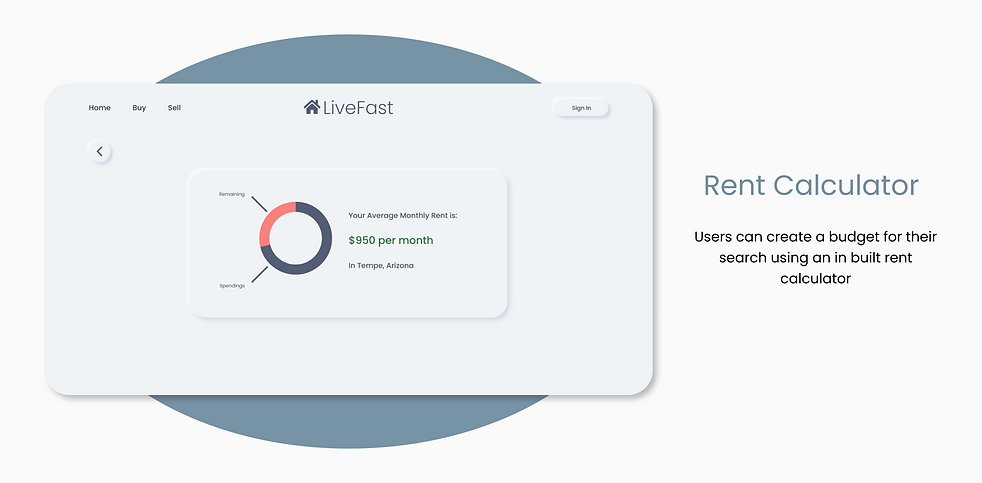
Rent Calculator - Users can calculate their budget based on their income, savings etc.
-
Rating Scores - The website contains a section where factors such transportation and safety are rated on a point scale
-
Reviews - Users can see reviews from current or past residents on the listing page so they don't have to spend time on a google search.
-
Preferences page - I found that users tend to have their preferences in mind before they start searching, so an intuitive solution here would be to allow the users to set their preferences before search results are shown.
Sitemap

Wireframes & Testing
Based on research findings, I went on to create lo-fi wireframes for the website. I created a prototype so could test out the user flow and overall feel of the website.

While testing, I found that most users disliked the login screen appearing before they could browse all the listings. Some users also requested a "Request Tour" feature so they could book an in-person tour of the apartment.
Style Guide
I chose to go with a "Neumorphic" design for a cleaner look. White is often associated with large spaces, so I thought it would give the website a more spacious feel. I added hover interactions to the buttons for aesthetic purposes. The typeface I used is Poppins, which seemed to go well with rounded edges within the interface.

Mockups
I then created the final mockups of the website. Below are the screens from a larger set representing the apartment search flow.

I also created a mobile version of the website.

Addressing Solutions
Following are some design solutions I proposed earlier. These features allow for convenience, efficiency, and transparency.


Takeaways
During the design process I realized that it is very important to keep in mind what people are used to when it comes to completing certain tasks. College students who search for apartments like to compare prices and information between different platforms, so it is essentially very difficult to create the "perfect" one-size-fits-all website for this kind of thing. However, I think my website does fairly well in terms of creating in interface for users to access multiple parts of the search process within the same platform. User feedback was key in this design process because even though the website looked visually appealing, the main purpose should be intuitive for the end user.
Next Steps
Create an application flow for users who want to finalize their apartment search and conduct more usability tests. Searching for listings and narrowing down to one option is the first half of the apartment hunt, but the application process is an even more daunting task for a lot of users. I would also like to design for additional screen sizes in the future.